• Skip to primary navigation
  • Skip to main content
  • Skip to primary sidebar
  • Skip to footer
Onyx Research and Engineering, LLC

ONYX

Your Vision. Our solutions.

  • HOME
  • PAST WORK
  • CONTACT US
  • PRIVACY

Chris Lawcock

AI: The Opportunity for Small Business

April 14, 2026 by Chris Lawcock

There have only been a handful of moments where small business owners truly gained time back.

First came the pager and mobile phone; suddenly you were reachable. Then the internet and smartphones; suddenly you were scalable. You could respond faster, organize better, and reach customers you would have never touched before.

Now we’re at the next inflection point. And it’s bigger.

Artificial intelligence is not just another tool. It is the first time small businesses can build custom systems that work the way they think. Not generic software. Not rigid workflows. Systems that adapt to you.

Automated email triage. Intelligent scheduling. Content generation. Customer insights. Internal tools that would have required a full engineering team just a few years ago.

But there’s a catch.

AI introduces a new layer of complexity:

  • Too many tools
  • Too many models
  • Too many promises

And underneath it all, real risks:

  • Cost: The wrong model or architecture can quietly burn money
  • Stability: Outputs can drift, break, or behave unpredictably
  • Practicality: Not every problem should be solved with AI

This is where most small businesses get stuck. Not because AI isn’t useful, but because navigating it correctly matters.

That’s where Onyx Research and Engineering comes in.

We don’t just recommend tools. We design and implement systems that are:

  • Cost-efficient
  • Production-ready
  • Aligned with how your business actually operates

And we’ve already done it ourselves:

  • This blog post was created with AI
  • Our website is continuously refined with AI-assisted workflows
  • Our email processing and review systems are AI-driven

It works. But only when it’s done right.

AI is not about replacing what you do. It’s about removing the friction around it.

Let us help you explore what’s possible, prioritize what matters, and implement it in a way that is stable, efficient, and actually delivers value.

Contact Onyx Research and Engineering today.
Filed Under: Uncategorized

THE AI APOCALYPSE

April 10, 2026 by Chris Lawcock

It used to be a buzzword. Then it became a headline. Now it’s a boardroom mandate. Artificial intelligence has moved from science fiction to your competitor’s tech stack — and if you’re not paying attention, you’re already behind.

Let’s break down what’s actually happening, who the major players are, and more importantly — what it means for your business.

THE PLAYERS

Five companies are driving the AI revolution. Each has a different angle, a different model, and a different bet on where this all goes.

Anthropic is the safety-first AI lab founded by former OpenAI researchers. Their Claude model family — currently on Claude 4 — is widely considered one of the most capable and reliable AI systems available. Backed by Amazon and Google, Anthropic’s focus on responsible AI development sets them apart in a race that often prioritizes speed over safety. Their Claude Code tool (more on that below) is redefining what AI can actually do.

Google isn’t playing catch-up — they invented much of the underlying technology that powers modern AI. After merging DeepMind and Google Brain into Google DeepMind, they’ve unleashed the Gemini model family across Search, Workspace, Android, and beyond. Google’s distribution advantage is unmatched. Gemini is already inside tools billions of people use every day.

OpenAI put AI on the map with ChatGPT — and they’re not slowing down. GPT-4o, the o1 and o3 reasoning models, and a growing suite of agent tools (Operator, the Assistants API) have made OpenAI the consumer mindshare leader. Heavily backed by Microsoft, they’re moving fast and aiming to build AGI — artificial general intelligence. Whether that’s inspiring or terrifying probably depends on who you ask.

Meta is playing a different game entirely. Rather than locking their models behind APIs, Meta has open-sourced the Llama model family — meaning anyone can download, modify, and deploy them. AI is already baked into WhatsApp, Instagram, and Facebook. Meta’s bet is that open weights become the new standard, and that giving away the model builds a moat through adoption and ecosystem.

Microsoft made one of the smartest infrastructure bets in tech history with their OpenAI investment — and now they’re collecting. Copilot is embedded in Word, Excel, Outlook, Teams, Windows, and GitHub. For enterprise businesses already living in the Microsoft ecosystem, AI just showed up to work. No setup required.

THE HYPE IS REAL

Everyone’s talking about AI. But the shift that actually matters isn’t chatbots — it’s agents.

An AI agent is software that can reason about a goal and take real actions to achieve it. Not just answer a question. Actually do the work. Browse the web, write code, send emails, update a database, run a campaign. Autonomously. In sequence. Without you babysitting every step.

This is a fundamentally different category of tool.

One of the best examples of this right now is Claude Code — sometimes called Clawbot — Anthropic’s AI coding agent that runs directly in your terminal. It reads your codebase, writes and edits files, runs commands, manages git, fixes bugs, and builds features. Developers who’ve used it describe it as having a senior engineer available around the clock who never gets tired and never complains about technical debt.

That’s the shift. We’ve moved from “AI answers questions” to “AI does the work.” And it’s happening across every industry.

WHAT THIS MEANS FOR SMALL BUSINESS

Here’s the uncomfortable truth: large companies have entire teams of engineers building custom AI workflows, automating processes, and gaining competitive advantages you can’t see yet. But you will feel them.

The good news? You don’t need a team of engineers. You need the right partner.

AI isn’t just for tech giants. The small business that figures out how to deploy even a handful of intelligent automations is going to outpace competitors who are still doing things manually. The playing field is leveling — but only for the ones who show up.

HOW ONYX CAN HELP

We build custom AI agent workflows for small businesses. Not generic tools. Not off-the-shelf software with an AI badge slapped on it. Custom-built systems that slot into how you actually work and start delivering results fast.

Here’s where we’re building right now:

Campaign Workflows — AI agents that research your audience, draft copy, generate visuals, schedule across channels, and report on performance. From brief to live in a fraction of the time.

Website SEO — Automated content audits, keyword gap analysis, on-page optimization, and content generation pipelines that keep your site climbing the rankings without the monthly agency retainer.

Social Media — Stop manually posting. Agent workflows that generate on-brand content, schedule across platforms, monitor engagement, and surface what’s working so you can double down.

Sales Pipelines — AI that qualifies inbound leads, personalizes follow-up sequences, updates your CRM, and flags hot prospects before they go cold. Your sales team closes — the agent handles the grind.

Voice AI — Custom voice agents that handle customer intake calls, answer FAQs, book appointments, and route inquiries — 24/7, no hold music, no missed leads.

Custom Automations — If it’s repetitive and it’s eating your team’s time, we can build an agent for it. Inventory updates, invoice processing, client onboarding, reporting — if a human does it on a schedule, an agent can probably do it better.

AI isn’t coming — it’s here. The question is whether it’s working for you or your competition.

We love helping small businesses get ahead and we’d love to talk about what’s possible for yours.

Loading

Filed Under: Uncategorized

ONYXCAM

November 8, 2020 by Chris Lawcock

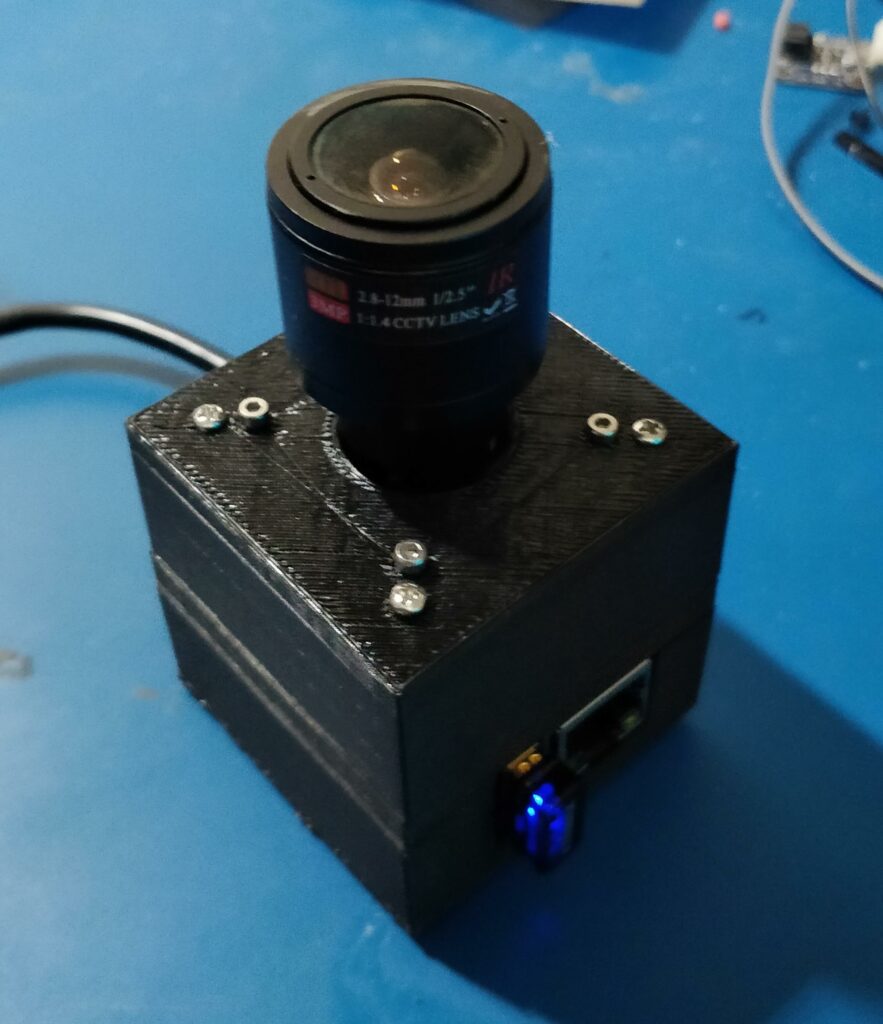
I always wanted an extensible platform for prototyping my machine vision tests and a potential hardware product for tracking and volumetric capture. Here are my first three devices!

ONYXCAM Powered
ONYXCAMS

The housings of the first three prototypes are printed 3 part PLA with an aluminum heatsink. You can see from the video above a simple flyout of the design.

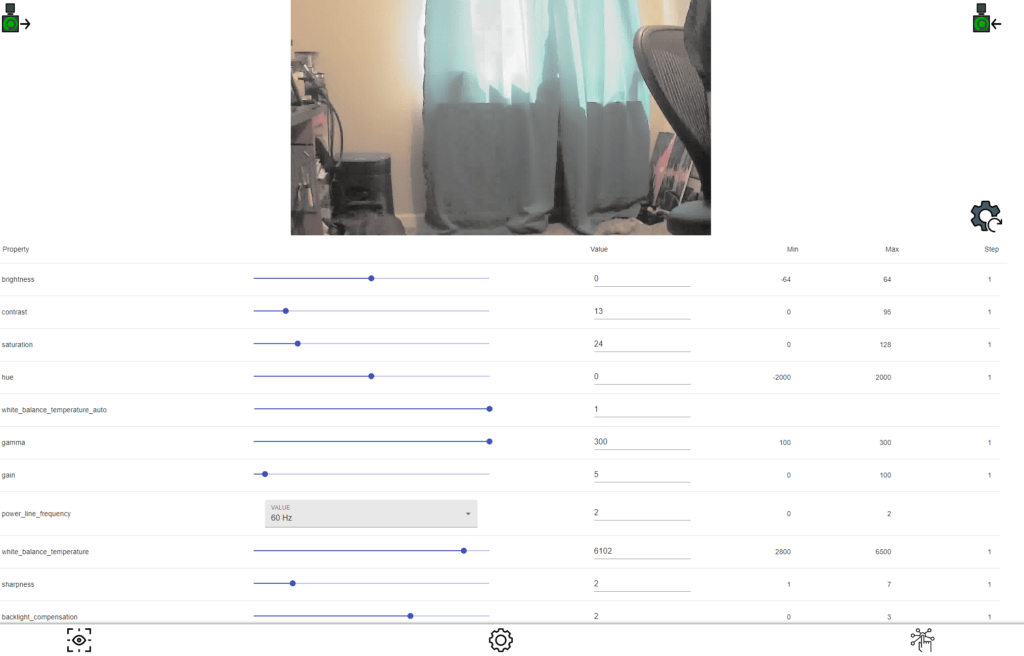
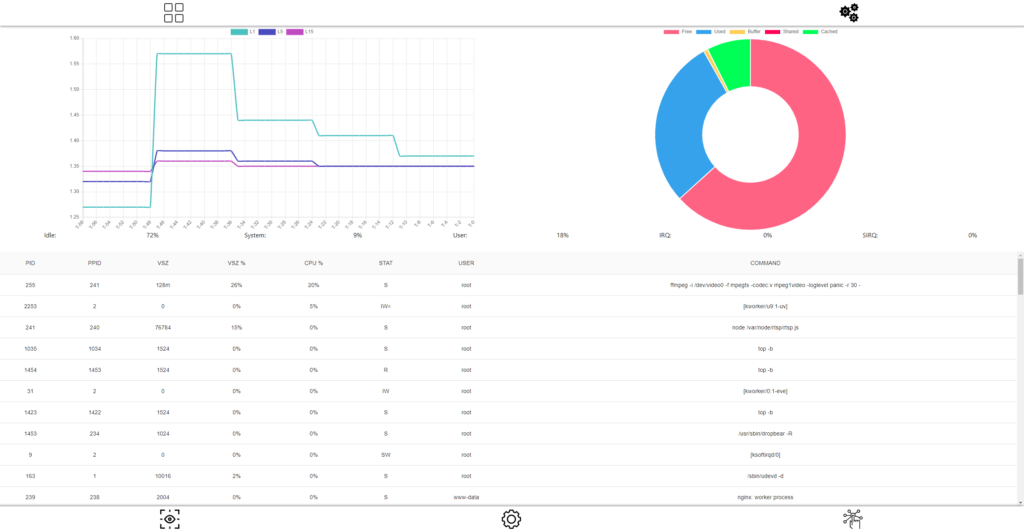
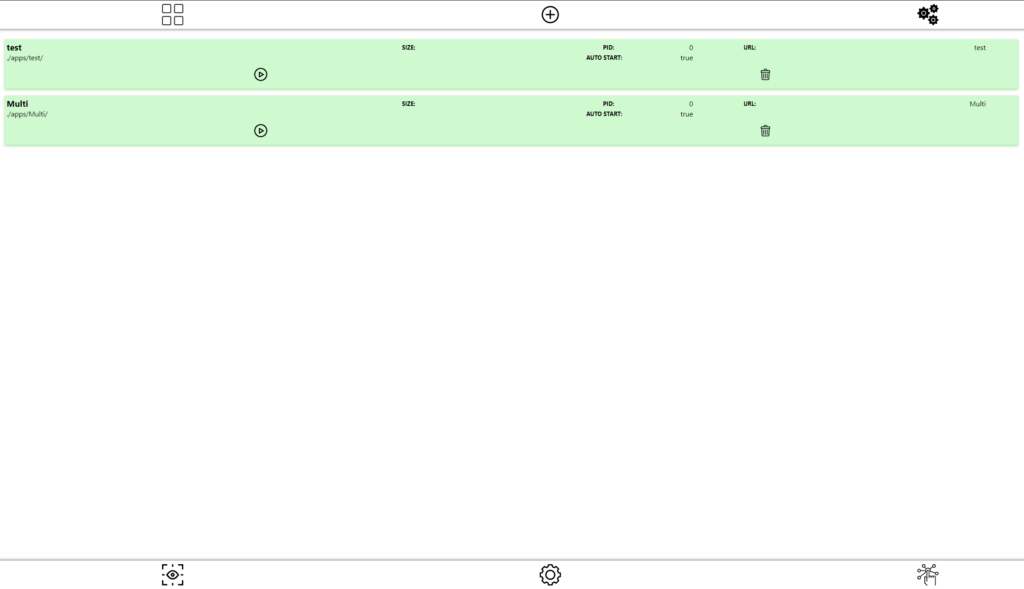
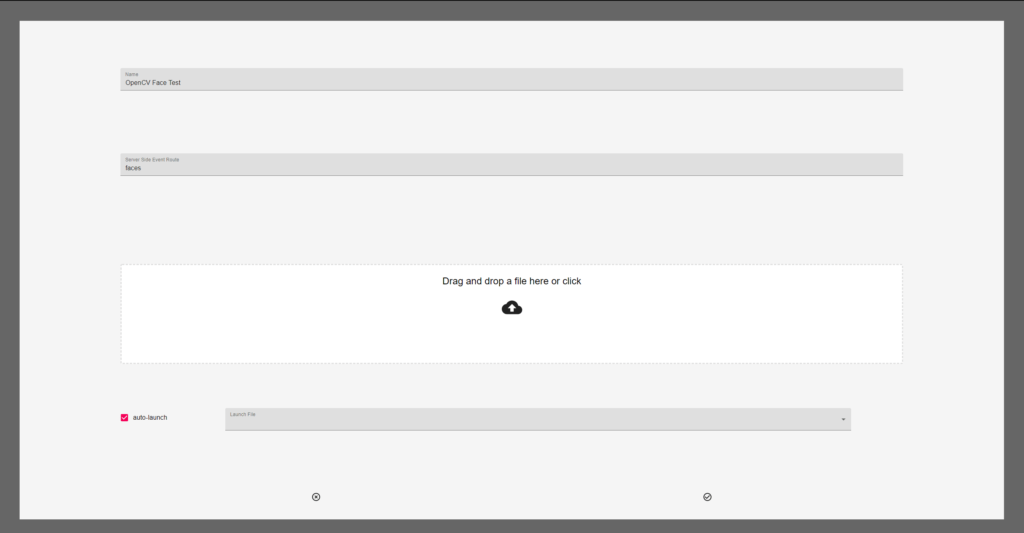
The cameras run a custom built version of Linux which leverages custom DTB to expose all available USB ports of the SOC. The cameras run a web server which hosts a node.js and serves a react app for camera preview, configuration and control!

Camera settings view
Live stream CPU stats view
Apps view with two apps active
App upload view drop and drag

Over all pretty happy with the design, now the fun begins prototyping and extending the API.

Filed Under: C/C++, Hardware Development, HTML, JavaScript, Linux Hardware, Linux Software, Node.JS, React, Software Development, Web Tagged With: Embbed, html, linux, NODE.JS, React, web

TODAY’S SEO GAME

October 31, 2020 by Chris Lawcock

Back in the day (don’t all great stories start this way?) when search engines were new it was easy to have a web presence and with a few pages and a healthy dash of metatags and you were off to the races! These days with machine learning and continuously improving data analytics you have to engage in a great deal of effort to rank naturally and metatags and a nice website are not enough! You’re going to need a plan.

SEO IS ABOUT RELEVANCE

So, whatever you do, there are probably others in your market space and industry who’ve been doing it longer. This isn’t a problem, just a reality. You can hope that they haven’t been engaging customers on the web or social media platforms, but who would want to take those odds? Here, let’s take a simple example: Pool Supplies.

So here is an interesting tale of two companies:

AZ Pool Supply Warehouse – A small local single location pool supply company.

Lesile’s Pools – A nationwide pool supply company started in 1963 in California.

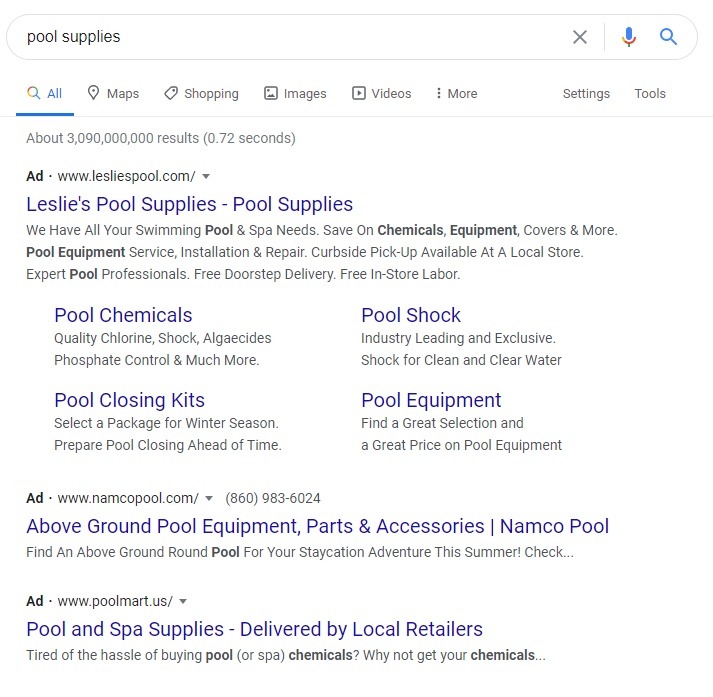
First we’ll start with the Google Ad’s to the search:

Google search AD results

So there is Leslie’s “buying” their way to the top of the list. Not a bad choice at all for a nationwide company. Not surprising, but the next image is!

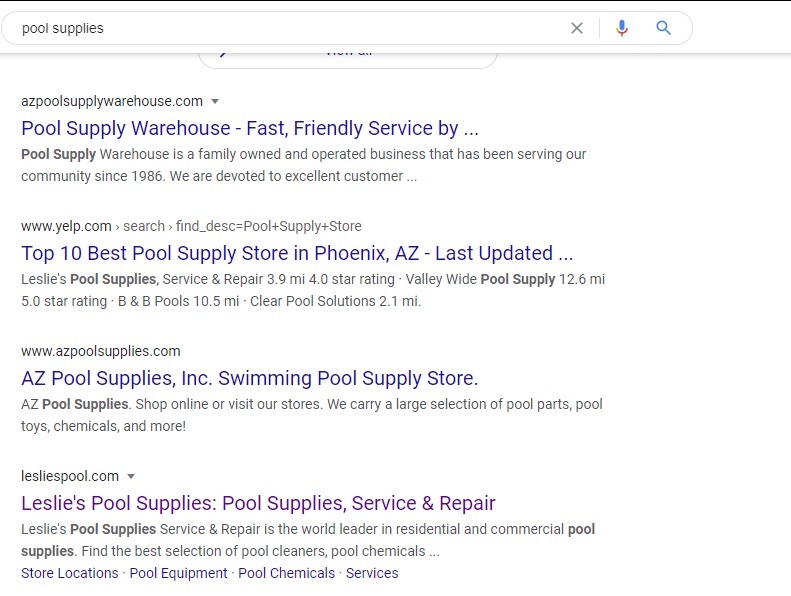
Google natural search results

These are the “natural” results. Basically, azpoolsupplywarehouse.com is considered by Google to be more relevant! Take a look at both of their sites, to the human eye they’re both “doing” the same thing. In terms of SEO, the sites and the company’s web presence are not equal. Just think about “buying” your top spot. Ok. So when you Google do you go to the very first AD returned? Probably not, at a minimum if it’s local you check the map for the closest locations. Do you check the “natural” results vs the AD before you click? Most likely. So in a perfect business world, you want both top spots!

LAY OF THE LAND

You’ve got a business to run! Do you have time to learn the lay of the SEO land? Well, if you want those ambient sales that come from more than your physical presence or word of mouth, you’ll need to. It’s an investment. Anyone telling you otherwise is selling you snake oil. Make sure your business and its website are registered with Google. You’re going to need to become comfortable with as many social media platforms and business platforms as possible and create a company presence. Try out Namechk. It will be a bit overwhelming, it’s a lot, but it matters! Once you’ve taken these first steps, it’s time to consider blogs, posts, and perhaps an ad campaign on the most appropriate platforms. This is not a fire and forget process these days. You’ll need to tend to your platforms, engage your customers, and share. Sound tiring? It doesn’t have to be with the right team on your side.

We love helping small business thrive and we’d love to help you!

Loading

Filed Under: HTML, SEO, Web Tagged With: Search, SEO, Small Business, web

SIMPLE SITE GUIDANCE FOR A SMALL BUSINESS

October 26, 2020 by Chris Lawcock

More than likely you’re not in the business of design and that’s just fine. That being said, you should at least consider a few things regarding your business’ website and make sure whomever you’ve engaged to make or maintain your site is making good choices for your visitors. Here’s a quick checklist of the most perceptible and obvious site consideration.

Rainbows of color!

1. CONSISTENT COLOR SCHEME

There’s a lot to know about color and how it can be used. As a small business owner, for now anyway, just focus on a simple question: How many colors are in my site’s color scheme?

In general, your colors should come from your company’s logo or perhaps your call to action image on your front page. But at most you should be looking at four colors to create understanding and drive interaction.

2. BALANCED AND HARMONIOUS

Open your site, no matter what the layout. Does it have balance? Your eyes should be able to pick a dominant feature (hopefully related to what you do!) and from there you should intuitively know what to do next. Your site should allow your visitor to flow through. (Ex: Nike, Google, Adobe) There should be a sense of harmony, a cadence that keeps your visitor engaged. Like this post? (1 – 2 – 3)

3. NEGATIVE IS POSITIVE

Probably the only time in life you’ll hear that! In this case, we’re talking about negative space or how busy is your site? Using negative space (lack of stuff) allows your visitor to be drawn to what matters (Your business!) and doesn’t make them work (Cognitive loads are bad mmmm kay?)

WRAPPING IT UP

These are just a few items that are easy to consider as a small business owner. Hopefully you look at your site and are able to nod your head in agreement with the above items. If not? We’d love to chat about the basics and a whole lot more! (Heck we didn’t even get into SEO or any of the finer points of site design)

Loading

Filed Under: HTML, Uncategorized, Web Tagged With: BALANCE, BUSINESS, COLOR, DESIGN, HARMONY, SCHEME, WEBSITES

PASSPORT DEV SETUP

October 1, 2020 by Chris Lawcock

I’ve been on a bit of a Node.js kick lately. It scales well and is supported on every platform I’ve come across (Embedded, Cloud, and Server). Starting my new business app I decided to move from Django to Node.js for the project so I can leverage Google’s AppEngine platform. All of this is going smoothly and then I wanted to add Social Login support, no various providers have kind of standardized on OAuth. So to avoid having to reinvent the wheel I choose passport.js this package has “strategies” for all major OAuth implementations and typescript support (mostly). Now I like to develop locally and deploy. So here are my simple suggestions for setting up your environment for local development.

All secure OAuth implementations rely on limiting the domain and URLs for callbacks. Most modern implementations (ex: Facebook) now require HTTPS. Depending on the implementation it may not be possible to add local IPs or subnets. That’s not a problem you can alter your local host files to point to your local IP.

SETTING UP YOUR LOCAL HOST FILE

WINDOWS

Windows, believe it or not, has a deep dark Unix/Linux secret that has been present since Windows 95. It’s a host file buried in the dumbest possible spot and it still works! It’s located in the *cough* Windows etc folder. Usually, it’s found here:

C:\Windows\System32\drivers\etc

The hosts file has to be opened as administrator, it can be read by everyone but to save your changes the editor will need elevated privileges. Here’s my current hosts file for reference.

# Copyright (c) 1993-2009 Microsoft Corp.
#
# This is a sample HOSTS file used by Microsoft TCP/IP for Windows.
#
# This file contains the mappings of IP addresses to host names. Each
# entry should be kept on an individual line. The IP address should
# be placed in the first column followed by the corresponding host name.
# The IP address and the host name should be separated by at least one
# space.
#
# Additionally, comments (such as these) may be inserted on individual
# lines or following the machine name denoted by a '#' symbol.
#
# For example:
#
#      102.54.94.97     rhino.acme.com          # source server
#       38.25.63.10     x.acme.com              # x client host

# localhost name resolution is handled within DNS itself.
#	127.0.0.1       localhost
#	::1             localhost
 host.docker.internal
 gateway.docker.internal
# Added by Docker Desktop
192.168.1.25 host.docker.internal
192.168.1.25 gateway.docker.internal
# To allow the same kube context to work on the host and the container:
127.0.0.1 kubernetes.docker.internal
# End of section
127.0.0.1 dev.bzzzeee.com
127.0.0.1 dev.onyxrd.com

You can see the last two entries are examples of DEV hostnames. These allow callbacks from OAuth implementations to be routed to the local development express app. I’d recommend actually having your public DNS setup to route these dev hostnames to the proper production IPs. This will help prevent configuration accidents from breaking production if a dev hostname makes to out to production.

LINUX / MAC

If you’re in a Linux / MAC environment you’ll find your hosts file in the proper location (where it belongs):

/etc/hosts

There really is no difference in the format of the file. As with the windows version you’ll need elevated privileges so pick your editor (vi) and sudo your heart out!

NOTES ON PASSPORT

There are plenty of example references for using passport and it’s associated modules and strategies. That being said there are some nuances to implementations, especially since providers keep updating their terms of service and privacy strategies. These changes make a moving target for some of the information you may want for your Social Login strategy.

FACEBOOK

Facebook has flipped the switch on OAuth 2.0 and requires an OAuth app developer to utilize HTTPS. This means your express app will need to serve callbacks using HTTPS for development (check below).

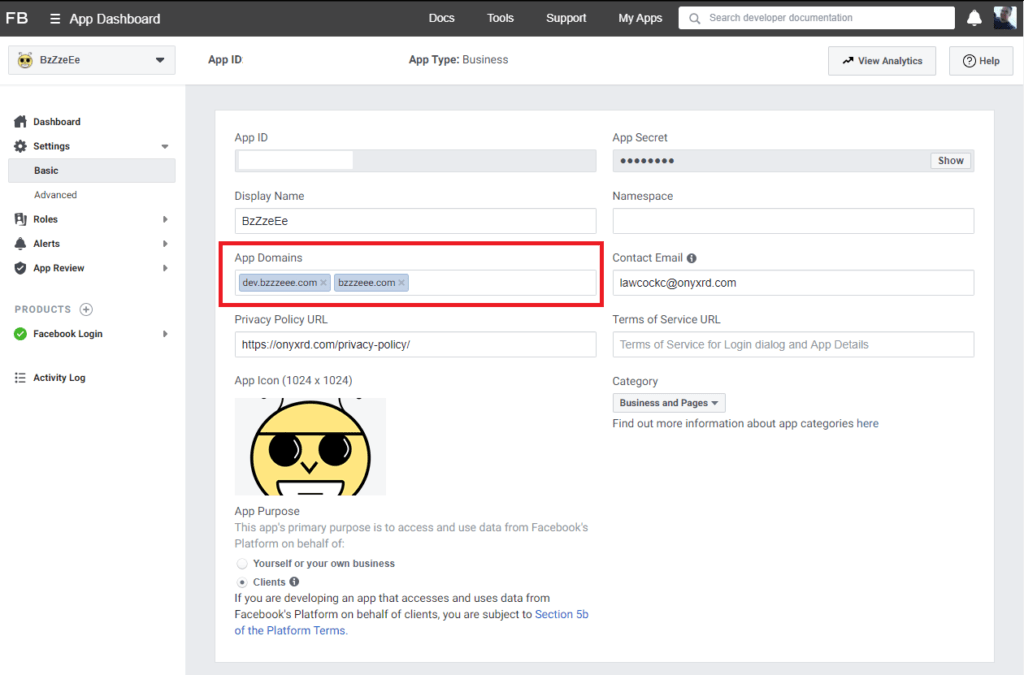
There are two areas in your FB app that you’ll want to assure are set up correctly. First is your app domains. For my purposes, I placed the domain and my dev hostname.

FB App Basic Settings

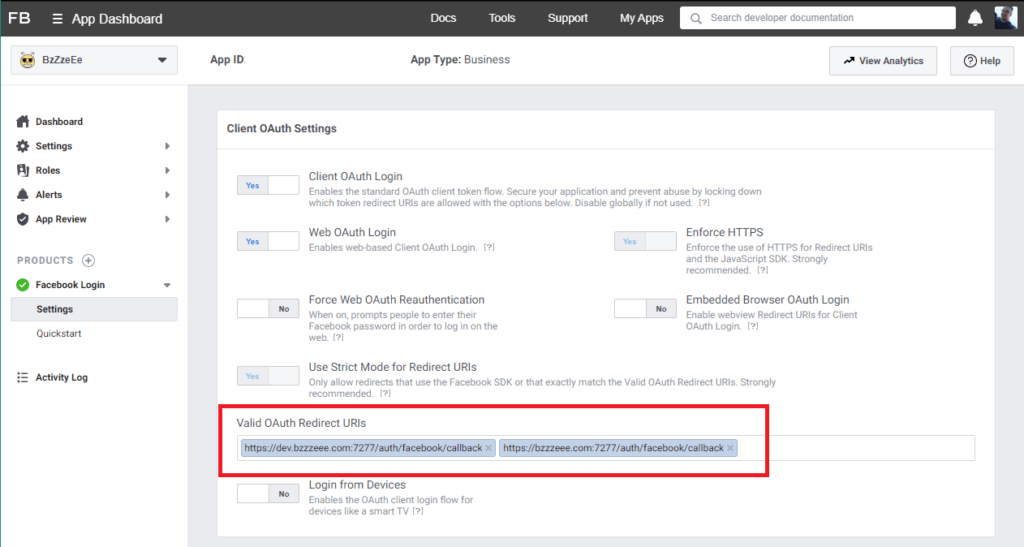
Next you’ll need to make sure you’ve enabled Facebook Login product for your app. The only thing you will need to adjust here are your callbacks. As I’ll do with all implementations, both the development and production callbacks are added to the Valid OAuth Redirect URIs.

FB Logon Settings

Passports facebook (OAUth2.0) strategy doesn’t work out of the box because of the ongoing changes from FB. You may need to add: profileFields: [‘id’, ’emails’, ‘name’] to your StrategyOptions and add a scope AuthenticateOptions to your authentication route ({ scope: [’email’] }).

        passport.use(
            new FaceBookStrategy(
                {
                    clientID: process.env.APP_FACEBOOK_ID as string,
                    clientSecret: process.env.APP_FACEBOOK_SECRET as string,
                    callbackURL: `${process.env.APP_URL}:${process.env.APP_PORT}/auth/facebook/callback`,
                    profileFields: ['id', 'emails', 'name']
                },
                (
                    accessToken : string, 
                    refreshToken : string, 
                    profile : Profile, 
                    done : (error: any, user?: any, info?: any) => void
                ) => {
                    const userProfile : UserProfile =
                    { 
                        username: `${profile.provider}#${profile.id}`, 
                        password: `${profile.provider}!${profile.displayName}`, 
                        email: profile.emails?.[0].value??'no@email.com', 
                        passportID: profile.id,
                        passportProvider: profile.provider,
                        firstName: profile.name?.givenName??'', 
                        lastName: profile.name?.familyName??''
                    };

                    this.findOrCreateUser(expressApp, userProfile, {accessToken, refreshToken})
                        .then(user=> {
                            done(null, user);
                        })
                        .catch(error=>{
                            done(error, undefined);
                        });
                }
            ));

        expressApp.get('/auth/facebook',
                        passport.authenticate('facebook', { scope: ['email'] }));

LINKEDIN

As with FB LinkedIn has undergone changes and even the typescript definitions for this strategy are out of date! I’ll be submitting a pull request for the fix but they have about +300 pull requests pending so… You know.

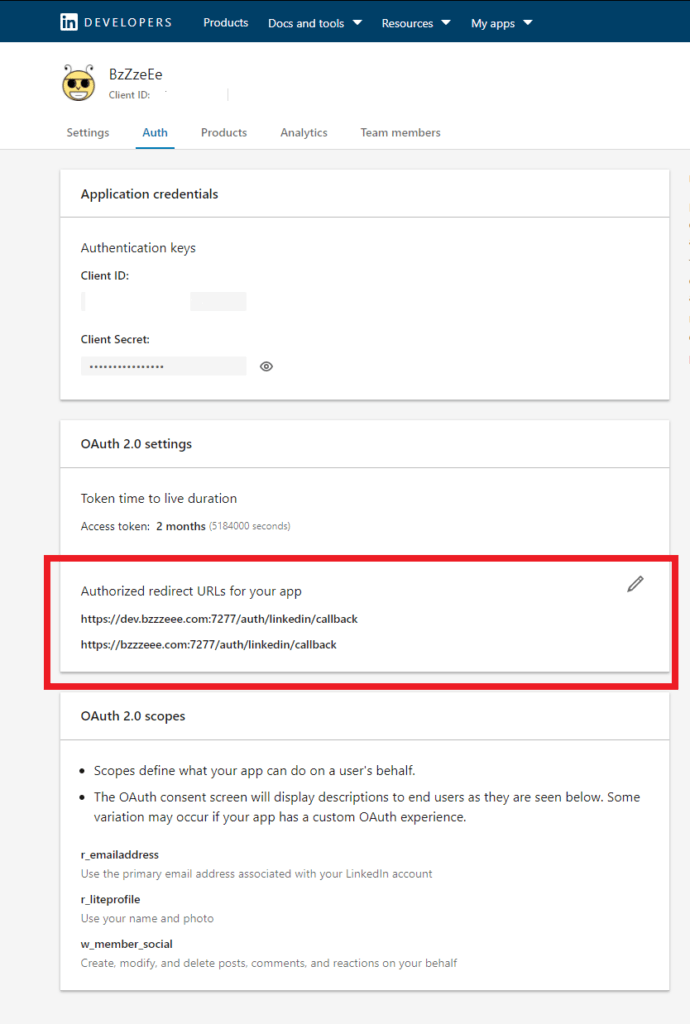
You can see in the image below an example of authorized redirect URLs for your app. Notice for my app I’ve added the development URL and the production URL. I can forget about these once released if I’ve setup my production DNS environment properly (i.e. dev.bzzzzeee.com) pointing at (bzzzzeee.com) and I can still develop on my local box.

LinkedIn App Auth Page

Anyway key points for your setup are probably best expressed from a code snippet

        passport.use(
            new LinkedInStrategy(
                {
                    clientID: process.env.APP_LINKEDIN_KEY as string,
                    clientSecret: process.env.APP_LINKEDIN_SECRET as string,
                    callbackURL: `${process.env.APP_URL}:${process.env.APP_PORT}/auth/linkedin/callback`,
                    //@ts-ignore because type library needs a pull
                    scope: ['r_emailaddress', 'r_liteprofile']
                },
                (
                    accessToken : string, 
                    refreshToken : string, 
                    profile : Profile, 
                    done : (error: any, user?: any, info?: any) => void
                ) => {
                    const userProfile : UserProfile =
                    { 
                        username: `${profile.provider}#${profile.id}`, 
                        password: `${profile.provider}!${profile.displayName}`, 
                        email: profile.emails?.[0].value??'no@email.com', 
                        passportID: profile.id,
                        passportProvider: profile.provider,
                        firstName: profile.name?.givenName??'', 
                        lastName: profile.name?.familyName??'' 
                    };
            ));

So you will need to set your scope properly. As of this writing, those two permissions (‘r_emailaddress’, ‘r_liteprofile’) will get the information you need. Passport actually has to make two API calls to LinkedIn one for the access and profile and another for the E-mail address. Go figure.

TWITTER

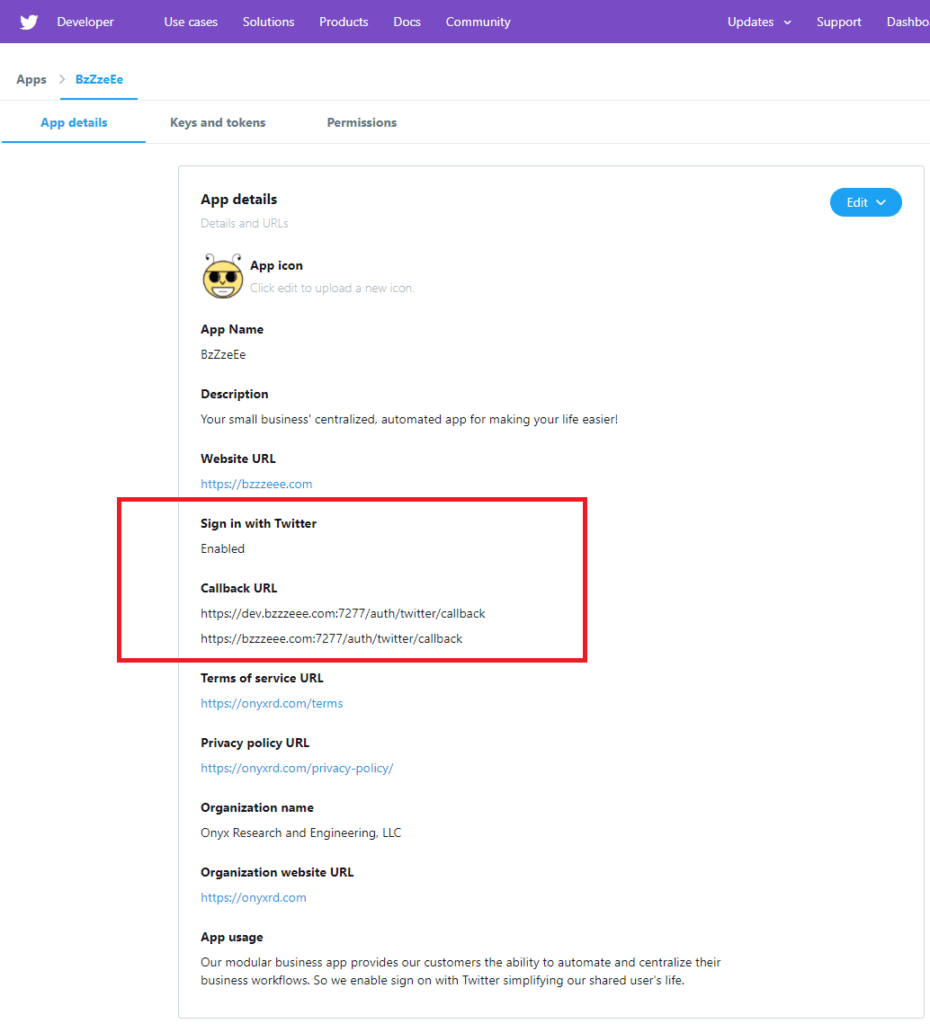
Twitter was by far the most straightforward to setup. When you create your app make sure to enable support for sign-in with Twitter. The rest is old hat by now my two callback URLs for dev and production.

Twitter App Details

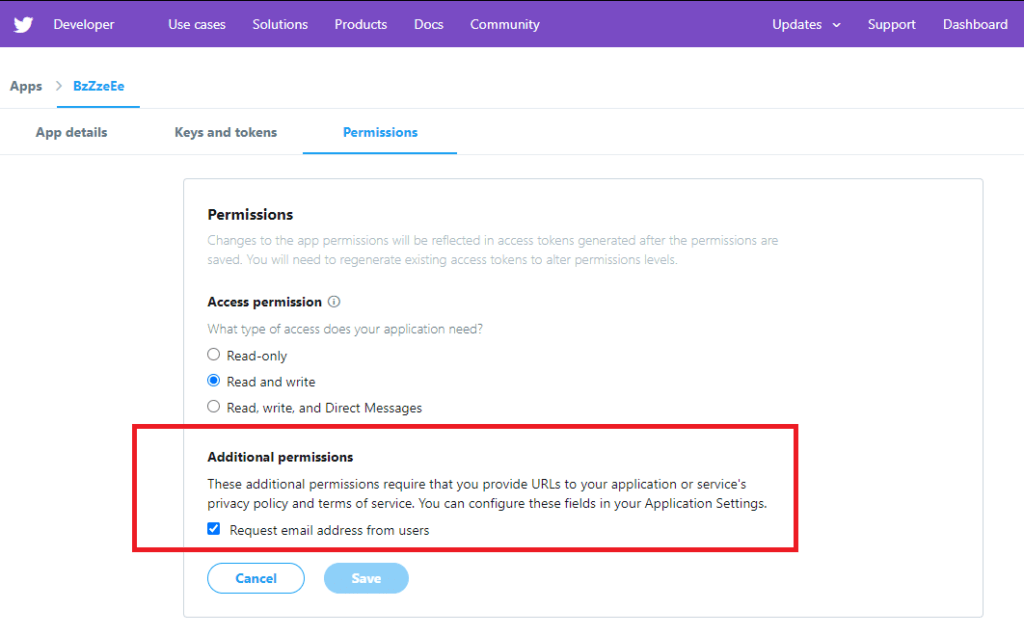
One item, the twitter account’s E-mail requires additional permissions. Which demands a privacy link and terms of service URL for you app before you can click the checkbox. Below is my app’s example.

The passport for Twitter OAuth is operational, you will have to add some twitter specific StrategyOptions ( includeEmail: true, includeEntities: true ), other than that you’re good to go!

        passport.use(
            new TwitterStrategy(
                {
                    consumerKey: process.env.APP_TWITTER_KEY as string,
                    consumerSecret: process.env.APP_TWITTER_SECRET as string,
                    callbackURL: `${process.env.APP_URL}:${process.env.APP_PORT}/auth/twitter/callback`,
                    includeEmail: true,
                    includeEntities: true
                },
                (
                    accessToken : string, 
                    refreshToken : string, 
                    profile : Profile, 
                    done : (error: any, user?: any, info?: any) => void
                ) => {
                    const userProfile : UserProfile =
                    { 
                        username: `${profile.provider}#${profile.id}`, 
                        password: `${profile.provider}!${profile.displayName}`, 
                        email: profile.emails?.[0].value??'no@email.com', 
                        passportID: profile.id,
                        passportProvider: profile.provider,
                        firstName: profile.name?.givenName??'', 
                        lastName: profile.name?.familyName??''
                    };

                    this.findOrCreateUser(expressApp, userProfile, {accessToken, refreshToken})
                        .then(user=> {
                            done(null, user);
                        })
                        .catch(error=>{
                            done(error, undefined);
                        });
                }
            ));

HACKING SOME HTTPS

For certain OAuth providers, you will need to provide HTTPS callback URLs. This is kind of pain as express apps don’t default to HTTPS and in production, this is often handled not by your app but by a proxy that serves your HTTP app and handles the necessary certs in a centralized manner. For development purposes, it doesn’t take much to create a dev cert and then add a few lines to your express app to serve HTTPS (Your browser is still going to complain about the validity of the cert but that’s ok). You can leverage OpenSSL to generate the necessary certificate and private key.

GENERATE YOUR KEYS

openssl req -x509 -newkey rsa:2048 -keyout site.pem -out cert.pem -days 365
openssl rsa -in site.pem -out key.pem

MODIFY YOUR EXPRESS

I’ll leave the actual implementation details for you. But the snippet below gives you the broad strokes.

        if (process.env.APP_ENV !== 'DEV')
        {
            this.server = express.listen(parseInt(process.env.APP_PORT as string), process.env.APP_HOSTNAME as string);
        } else {
            const key = fs.readFileSync('./key.pem');
            const cert = fs.readFileSync('./cert.pem');
    
            this.server = https.createServer({key: key, cert: cert }, 
            express).listen(parseInt(process.env.APP_PORT as string), process.env.APP_HOSTNAME as string);
        }
    }

Filed Under: JavaScript, Node.JS, React, TypeScript, Web Tagged With: DEVELOPMENT, JAVASCRIPT, NODE, NODE.JS, PASSPORT

  • Page 1
  • Page 2
  • Go to Next Page »

Primary Sidebar

Recent Posts

  • AI: The Opportunity for Small Business
  • THE AI APOCALYPSE
  • ONYXCAM
  • TODAY’S SEO GAME
  • SIMPLE SITE GUIDANCE FOR A SMALL BUSINESS

Recent Comments

    Footer

    Recent Posts

    • AI: The Opportunity for Small Business
    • THE AI APOCALYPSE
    • ONYXCAM
    • TODAY’S SEO GAME
    • SIMPLE SITE GUIDANCE FOR A SMALL BUSINESS
    • Facebook
    • LinkedIn
    • Twitter
    • YouTube
    • PROJECTS
    • POSTS

    Copyright © 2026 · Onyx Research and Engineering, LLC

    This website uses cookies to improve your experience. We'll assume you're ok with this, but you can opt-out if you wish. Cookie settingsACCEPT
    Privacy & Cookies Policy

    Privacy Overview

    This website uses cookies to improve your experience while you navigate through the website. Out of these cookies, the cookies that are categorized as necessary are stored on your browser as they are essential for the working of basic functionalities of the website. We also use third-party cookies that help us analyze and understand how you use this website. These cookies will be stored in your browser only with your consent. You also have the option to opt-out of these cookies. But opting out of some of these cookies may have an effect on your browsing experience.
    Necessary
    Always Enabled
    Necessary cookies are absolutely essential for the website to function properly. This category only includes cookies that ensures basic functionalities and security features of the website. These cookies do not store any personal information.
    Non-necessary
    Any cookies that may not be particularly necessary for the website to function and is used specifically to collect user personal data via analytics, ads, other embedded contents are termed as non-necessary cookies. It is mandatory to procure user consent prior to running these cookies on your website.
    SAVE & ACCEPT